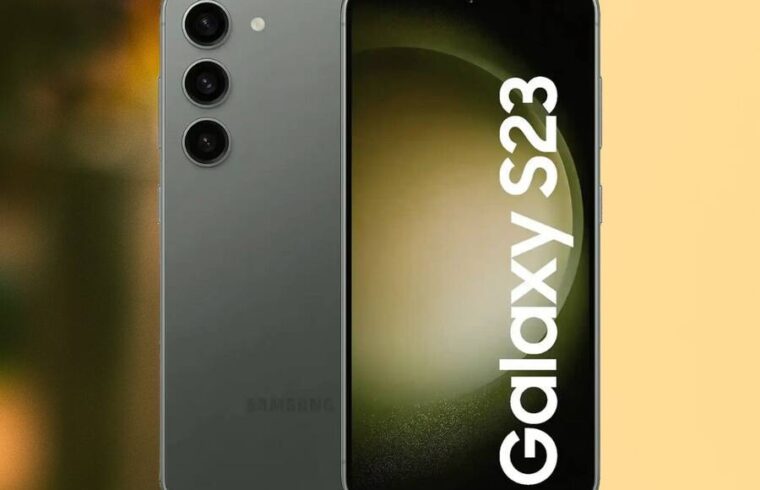
Are you a proud owner of a Samsung Galaxy S23, S23+, or the mighty S23 Ultra? Get ready, because the moment you’ve been anticipating has finally arrived! Samsung has officially commenced the global rollout of the stable One UI 8 update, bringing the latest Android 16 experience directly to your fingertips. This isn’t just another incremental patch; we’re talking about a significant overhaul designed to make your already fantastic device feel even more cutting-edge.
Imagine your phone receiving a powerful performance boost, a sleek new visual polish, and an ironclad security upgrade, all wrapped up in one exciting package. That’s precisely what awaits you with this new software. While the initial wave began in Samsung’s home turf of South Korea, don’t worry if you’re elsewhere. Reports are pouring in from users across Europe, Asia, and Africa, confirming that the update is steadily making its way around the globe. So, if you haven’t seen it yet, your wait won’t be much longer!
The Big Leap: One UI 8 and the Power of Android 16
This isn’t just a fresh coat of paint; it’s a complete revitalization. The new One UI 8 is built on the robust foundation of Android 16, which means your Galaxy S23 series device is about to unlock a whole new realm of possibilities. This update isn’t exclusive to one model; whether you wield the compact Galaxy S23, the versatile Galaxy S23 Plus, or the feature-packed Galaxy S23 Ultra, you’re all invited to this digital party.
A Smoother, More Intuitive User Experience
What can you expect from this transformative update? Samsung has poured considerable effort into refining the user interface, ensuring that every tap, swipe, and interaction feels more intuitive and responsive than ever before. Think of it like giving your favorite car a high-performance tune-up; everything just works better. Beyond the visual enhancements, you’ll experience a noticeable improvement in overall system stability. This means fewer hiccups, faster app launches, and a more consistently smooth experience throughout your day. Your phone isn’t just getting prettier; it’s becoming a more reliable and enjoyable companion.
Uncompromised Security: The September 2025 Patch
In today’s interconnected world, device security is paramount, wouldn’t you agree? Alongside the exciting new features and performance enhancements, the One UI 8 update for the Galaxy S23 series also brings the crucial September 2025 security patch. This isn’t just a minor detail; it’s your digital bodyguard against the ever-evolving landscape of online threats.
This latest security update provides enhanced protection against newly discovered vulnerabilities, keeping your personal data and privacy locked down tight. We strongly encourage all Galaxy S23 users to prioritize this update as soon as it becomes available in your region. Why take chances when a simple update can significantly bolster your device’s defenses and optimize its performance?
Getting Your Hands on One UI 8: Update Details & How-To Guide
Ready to dive into the future? Let’s talk about the specifics of this exciting upgrade.
Firmware Version & Download Size
For those who love the technical details, the firmware version accompanying this One UI 8 release is S91xBXXU8EYI5. Now, let’s talk about the size. For the Galaxy S23 Ultra, you’re looking at a substantial download of approximately 3.3GB. That’s a significant chunk of data, so we recommend connecting to a stable Wi-Fi network before initiating the download. Don’t worry, Galaxy S23 and S23+ owners – your update sizes might be slightly smaller, but still, Wi-Fi is your best friend here.
How to Update Your Galaxy S23 Series Device
Downloading and installing the update is a straightforward process. If you’re eager to experience One UI 8, just follow these simple steps:
- The first step is to navigate to your device’s Settings application. You can usually find this by swiping down from the top of your screen and tapping the gear icon, or by locating the “Settings” app in your app drawer.
- Scroll down and locate the “Software update” option. Give that a tap!
- Now, you’ll want to select “Download and install.” Your phone will then check Samsung’s servers to see if the One UI 8 update is ready for your specific device and region.
- If the update appears, congratulations! Allow it to download completely. Once the download is finished, you’ll see an option to “Install now.” Tap that button to proceed.
- Your device will automatically restart to apply the new software. This process usually takes a few minutes, so be patient. Once it’s done, your Galaxy S23 series device will boot up with the brilliant new One UI 8 interface, ready for you to explore!
What About the Galaxy S23 FE? Don’t Worry, Your Turn is Coming!
For our friends rocking the Galaxy S23 FE, you haven’t been forgotten! Samsung is also expected to release the One UI 8 update for your device globally very soon. Good news, it has already started rolling out in South Korea, which is usually a strong indicator that other regions will follow suit in the coming days. So, keep a keen eye on your software update settings; your device’s refresh is just around the corner!
Don’t Miss Out: Upgrade Your Experience Today!
Why wait? The stable One UI 8 update is more than just a software refresh; it’s an opportunity to reinvigorate your beloved Galaxy S23 series device. By updating, you’re not only getting access to the latest features and a smoother user experience, but you’re also ensuring your phone remains secure against evolving threats.
So, head over to your settings, check for that update, and prepare to rediscover your Galaxy S23 with the power and elegance of One UI 8 and Android 16. You’ll be glad you did!