Ah, the foldable phone. For years, it’s been the tech world’s unicorn – a mythical creature promising the best of both worlds: a pocketable smartphone that magically transforms into a tablet. We’ve seen many iterations, and frankly, some felt more like prototypes than polished products. But with the Samsung Galaxy Z Fold 8, it feels like Samsung has gone back to the drawing board, making some rather unexpected changes to its flagship foldable. And you know what? After spending weeks with it, I’m genuinely impressed.
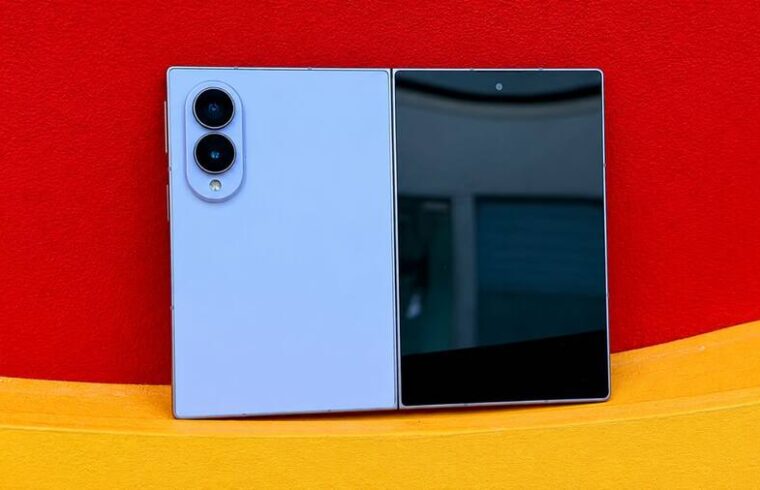
Gone is the super tall, super slim profile of its predecessors. Instead, the Fold 8 greets you with a shorter, wider stance. When closed, it truly does resemble a sleek, modern passport – compact yet substantial. My first thought? “Samsung, what have you done?” I honestly questioned if they’d made the phone aspect harder to use just to make the tablet experience smoother. But then I unfolded it, revealing a magnificent 7.6-inch tablet-like screen, and a new perspective began to unfold with it.
This isn’t just about a new processor or another batch of AI features. No, the real story here is the design evolution and how Samsung’s software leverages it to create a genuinely compelling user experience. It’s about finding that sweet spot where a phone and a tablet truly become one, without feeling like you’re lugging around two separate devices. So, let’s dive into what makes the Galaxy Z Fold 8 stand out from the crowd and why it just might be the most interesting foldable yet.
The Form Factor: A Bold New Shape
First Impressions: Passport or Puzzling?
Holding the Galaxy Z Fold 8 for the first time is certainly an experience. It’s shorter and noticeably wider than previous Fold models, and that instantly changes how it feels in your hand. The 5.5-inch cover display, combined with the overall proportions, gives it this distinct “small notebook” or “passport-like” vibe. Having been conditioned by years of ever-taller smartphones, this shift felt a bit jarring initially. I found myself thinking, “Is this progress, or just different for the sake of being different?”
Living with the Change: Practicality in Your Palm
But here’s the kicker: the more I used it, the more this new shape began to make sense. When folded, the Fold 8 measures 9.7mm thick and weighs 201 grams. That’s incredibly compact for a device that transforms into a 7.6-inch tablet, and it feels remarkably solid in the palm. Unlike some larger smartphones (my old iPhone 17 Pro Max comes to mind), it doesn’t have that “top-heavy” sensation. Instead, it feels balanced and comfortable, slipping into my jeans pocket without feeling like I’m carrying a brick or a small tablet.
Samsung has also pulled out all the stops on durability. The Flex Titanium display structure and Advanced Armor Aluminum frame give the phone a supremely premium feel, exuding confidence. The hinge mechanism, the heart of any foldable, feels incredibly solid, with just the right amount of resistance. It screams top-tier craftsmanship, exactly what you’d expect from a device in this price bracket. Plus, with an IP48 rating, it offers protection against water and larger solid objects. While that’s reassuring, remember: it’s still a foldable, and as such, it deserves a bit more caution than your standard slab phone – repair costs for these beauties aren’t for the faint of heart!
However, that wider cover display isn’t without its quirks. Reaching across the screen with one hand, especially to the opposite side, proved challenging for me. I often found myself resorting to two hands, particularly for typing or during extended scrolling sessions. So, while it’s certainly compact, I wouldn’t rush to call the Fold 8 a truly one-handed phone for all tasks. It’s a trade-off, but one that soon became part of my workflow.
A Tale of Two Screens: Cover vs. Inner Display
The Cover Display: Quick Glances, Quick Tasks
The 5.5-inch Dynamic LTPO AMOLED 2X cover display is, simply put, gorgeous. It’s bright, sharp, and buttery smooth thanks to its 120Hz refresh rate. I initially expected to barely use it, but I found myself reaching for it far more often than anticipated for those quick, everyday tasks. Checking notifications, firing off a short WhatsApp message, responding to an email, a quick Instagram scroll, or a fast Google search – the outer screen handled it all with aplomb.
This is crucial for any foldable, isn’t it? You shouldn’t have to open your phone every single time you need to interact with it. The Fold 8 gets this right. I can easily respond to texts or emails without unfolding, which genuinely saves time and effort. However, the wider aspect ratio does introduce a couple of minor compromises.
The vertical space on the cover screen isn’t as generous as on a traditional tall smartphone. This meant a bit more scrolling than usual when reading long articles or lengthy WhatsApp conversations. And the keyboard? When it pops up, it takes up a significant chunk of the screen, leaving less room to see what you’re actually typing. It’s not unusable, but it’s certainly not as comfortable for extended typing as a tall, slim phone. Over time, I naturally adapted: quick replies on the cover screen, and if I needed to type anything longer, I’d instinctively unfold the device. It became almost second nature.
Unfolding the Magic: The Immersive Inner Display
But the true reason to buy the Galaxy Z Fold 8 reveals itself when you open it. The inner Dynamic LTPO AMOLED 2X display is nothing short of stunning. With its 120Hz refresh rate, HDR10+ support, and an astonishing 3,000 nits of peak brightness, everything just looks good on it. Text is incredibly crisp, colors pop with vibrant accuracy, and scrolling is liquid smooth. Even outdoors in bright sunlight, visibility is excellent – no squinting required!
What truly makes this screen shine, though, is its aspect ratio. The near-square 4:3 layout provides a significant amount of horizontal space, which is a game-changer for productivity. Reading articles, reviewing spreadsheets, or navigating complex documents feels far more natural and less cramped than on a standard phone. I found myself using the inner display for tasks I would never dream of doing on a regular smartphone, like editing a multi-page document or diving deep into analytics.
Watching videos is also a joy. While standard 16:9 videos will have small black bars, they’re far less intrusive than on some other squarer foldables. The Fold 8 handles landscape videos beautifully. And what about the crease, you ask? Yes, if you actively look for it, you’ll see it, and you’ll feel it when your finger glides over it. But honestly, after a couple of days, my brain simply tuned it out during normal use. And for me, that’s the highest praise I can give Samsung’s foldable display technology – it just starts to feel normal, like it’s always been there.
Powering Your Productivity & Play: Performance & Software
Under the Hood: Snapdragon’s Muscle
Of course, a beautiful screen is only as good as the horsepower driving it. The Galaxy Z Fold 8 is powered by the bespoke Snapdragon 8 Elite Gen 5 for Galaxy. This chip is no slouch, ensuring that whether you opt for the standard 12GB RAM version or the beefier 16GB RAM in the 1TB storage variant, you’re getting blistering performance. In day-to-day use, this phone is incredibly responsive. Apps launch instantly, switching between multiple applications is seamless, and animations are consistently fluid. There are no noticeable slowdowns, even when pushing the device hard.
More importantly, this performance is perfectly aligned with the Fold 8’s multitasking prowess. Juggling Chrome, WhatsApp, Gmail, YouTube, and a dozen other apps? The phone handles it without a single blink. This is where the additional RAM in the higher storage model truly shines, allowing more applications to remain “ready” in memory for instant access. While the phone can get a bit warm during intensive gaming sessions, I never experienced any significant heating issues during regular use, which is impressive given its slim profile.
One UI 9: Redefining Multitasking
A big screen is useless if the software doesn’t know how to handle it. Thankfully, One UI 9 on the Fold 8 doesn’t just stretch smartphone apps; it redefines how you interact with them. This is where the Fold 8 truly differentiates itself from a conventional smartphone.
Imagine running three applications simultaneously, resizing their windows on the fly, and effortlessly dragging and dropping content between them. This isn’t a desktop PC; it’s the Galaxy Z Fold 8. I found myself routinely having WhatsApp, a web browser, and another app open at the same time, eliminating the constant opening and closing routine. It might seem minor, but once you’ve experienced it, going back to a regular phone can feel incredibly confining. The persistent taskbar is another stroke of genius, allowing for lightning-fast switching between your most used apps without ever needing to hit the home screen.
Crucially, many popular apps like Gmail, Chrome, and YouTube Music intelligently adapt to the larger screen, switching to a more tablet-like, two-pane layout. This attention to detail is something Samsung has truly nailed with the Fold 8’s software optimization. It’s not just more screen; it’s a completely reimagined way to use that screen.
However, the Android app ecosystem still has some catching up to do. While many apps are well-optimized, there are still a number that don’t scale perfectly on foldable displays. This can be quite obvious with certain games or apps designed with a strictly vertical orientation. It’s not a performance issue, but an optimization one, and it’s an area where the broader Android community needs to put in more effort.
Beyond the core multitasking, Samsung’s ecosystem offers seamless benefits if you already own other Galaxy devices, with features like file sharing and cross-device connectivity. And let’s not forget Samsung DeX. Just tap your Fold 8 to a larger display, and you’re greeted with a desktop-like interface. With the raw power inside, this phone can handle many tasks typically reserved for a laptop, making it another fantastic example of how the Fold 8 transcends the limitations of a traditional smartphone.
Gaming on the Fold 8: A Giant Leap
Is the Galaxy Z Fold 8 a gaming phone? Not specifically, but it certainly doesn’t shy away from a challenge. The Snapdragon 8 Elite Gen 5, paired with up to 16GB of RAM, provides ample power to run demanding titles. Games load quickly, and you can comfortably play high-end games at elevated graphics settings.
However, the real differentiator for me wasn’t the raw performance, but the 7.6-inch inner screen itself. Gaming on this expansive display is a completely different ballgame compared to a standard-sized smartphone. You get so much more room to view the game world, and your controls feel far less cramped. Games with intricate environments, like Genshin Impact or Honkai: Star Rail, truly benefit from the added immersion. The 120Hz refresh rate also ensures that games supporting higher frame rates feel incredibly fluid, making for a more responsive and enjoyable experience in titles like Call of Duty: Mobile and PUBG Mobile.
But again, the unusual aspect ratio occasionally rears its head. Not all games are perfectly optimized for the 4:3 foldable display. Some fit perfectly, utilizing the entire screen, while others can look awkwardly stretched or leave unused space, especially those primarily designed for tall, narrow smartphone displays. For instance, a game like Pokémon GO might feel a bit clunky on the larger screen, simply because its vertical design isn’t naturally suited to the wider canvas. This isn’t a performance bottleneck; it’s an optimization challenge that game developers need to address.
And then there’s the heat. The Fold 8 definitely gets warm during prolonged gaming sessions, particularly with graphics-intensive titles at high settings. While it didn’t immediately impact performance, it’s noticeable. This is likely a trade-off for the phone’s impressively thin body – there’s only so much space for advanced cooling solutions. So, while I wouldn’t recommend buying the Fold 8 solely for gaming, if you’re already in the market for a foldable and enjoy mobile games, rest assured you’ll have a powerful and often visually stunning experience when games are properly optimized.
The Lens and the Juice: Camera & Battery Life
Camera Compromises: A Missing Telephoto
Perhaps the biggest compromise on the Galaxy Z Fold 8 comes in its camera setup. It features a capable 50MP main camera with optical image stabilization and a 50MP ultrawide camera. Notice anything missing? That’s right, there’s no dedicated telephoto lens. For a phone that costs Rs 1,79,999 (which is quite a hefty sum!), this feels like a significant omission.
The main camera is undoubtedly the star of the show. In good daylight, photos are packed with detail, boast vibrant colors, and offer a wide dynamic range. For everyday photography – snapping pictures of your lunch, pets, or friends – the results are easily good enough. The ultrawide camera is also excellent for capturing expansive landscapes, architectural shots, and group photos. I particularly appreciated the consistent color science between the two lenses; switching between them doesn’t drastically alter the mood or color profile of your shots.
Low-light performance is also pretty solid. However, the moment you want to zoom, the absence of that telephoto lens becomes painfully apparent. While the main sensor can handle a 2x crop relatively well, pushing it to 4x or 10x digital zoom results in a noticeable and often unacceptable loss of detail. This is a difficult pill to swallow, especially when Samsung’s own standard flagships offer far more versatile camera systems, often including impressive telephoto capabilities.
The obvious reason for this omission is space. Samsung has been pushing to make the Fold 8 thinner, and adding a chunky telephoto camera module would undoubtedly increase its thickness. Despite this, potential buyers should be aware: the Fold 8 is a solid camera phone, but it’s not Samsung’s most versatile, nor its best, if zoom is a priority for you.
Selfies & Video: Getting Creative
For selfies, the Fold 8 includes 10MP selfie cameras on both displays. They’re perfectly adequate for video calls and your daily dose of self-portraits. But if image quality is paramount, Samsung offers a clever workaround: use the main rear camera with the cover display as your viewfinder. It might look a bit awkward to passersby, but the improved results are undeniable.
For video creators, Samsung has added some interesting features. LOG video and LUT support offer greater control over your footage during editing, a definite plus for serious videographers. I also stumbled upon My FanCam, an intriguing feature that can detect a person in an existing video and intelligently generate a “crop” that keeps them in focus. It’s not always flawless, especially with fast-moving subjects, but if you frequently create social media videos, it could be a significant time-saver, handling much of the cropping and reframing automatically.
Battery Endurance: All-Day Power
The Galaxy Z Fold 8 packs a 4,800mAh battery. For a phone with two power-hungry screens, that might not sound like much on paper, does it? However, in real-world use, I found the battery life to be surprisingly predictable and reliable. With typical usage – browsing, messaging, snapping photos, social media, and a bit of video watching – I comfortably made it through a full day without needing to reach for a charger.
A major contributor to this endurance is the efficiency of the cover screen. For quick tasks like checking notifications or firing off a short message, I simply didn’t need to open the power-hungry inner display, saving valuable battery. Of course, heavy gaming, extensive video recording, or prolonged use of the larger inner screen will deplete the battery faster, but that’s to be expected.
Samsung has also reportedly incorporated Silicon-carbide battery technology, which likely contributes to the decent endurance in such a thin package. It feels like a logical approach: rather than simply boosting capacity and making the phone thicker and heavier, Samsung has focused on efficiency. While a larger battery would always be welcome, this balance feels right for the Fold 8’s compact design.
When it comes time to top up, the phone supports 45W wired charging. It’s not the absolute fastest charging system in the flagship segment, but it’s more than adequate for a rapid recharge when you’re in a pinch. Wireless charging is also supported, adding to the convenience.
The AI Edge: Smart Features for a Smarter Device
Galaxy AI & Gemini: More Than Just Gimmicks?
Samsung has deeply integrated a plethora of AI features into One UI 9, bringing both Samsung’s own Galaxy AI tools and Google’s Gemini to the Fold 8. And I must say, some of them are genuinely useful, moving beyond mere gimmicks.
Features like Nudge can proactively suggest actions based on what’s happening on your phone, and Gemini can intelligently interact with supported apps to execute these actions. Imagine your phone predicting your next move! Transcript Assist is another helpful productivity tool that feels perfectly at home on a device geared towards getting things done. For anyone who regularly conducts interviews, meetings, or detailed discussions, having the phone accurately transcribe spoken words can save an immense amount of time and effort.
Then there’s the handy Photo Assist feature, which includes a beloved capability: removing unwanted objects from photos. While it’s not always flawless (especially with complex backgrounds), it’s good enough that I could easily envision myself using it regularly for quick touch-ups. AI editing features are also available within Creative Studio, offering even more powerful image manipulation.
However, and this is important, I wouldn’t purchase the Fold 8 solely for its Galaxy AI features. While they are nice additions and certainly enhance the user experience, they don’t fundamentally change what the Fold 8 is. The true magic, the real reason to buy this phone, lies in the powerful combination of its two displays and the ingenious software built around them. These AI features are the icing on a very impressive cake, not the cake itself. Kudos to Samsung for integrating them so seamlessly, though!
The Fold 8 Experience: What’s Missing?
The Flex Mode Conundrum
One Samsung foldable feature that I genuinely found myself missing on the Fold 8 was Flex Mode. On other Samsung foldables, partial folding allows you to run different apps side-by-side on the two halves of the screen, watch videos with controls on the bottom, or simply prop the phone up on a surface without needing a stand. The Fold 8’s new hinge design, while excellent for thinness, doesn’t quite allow for the same versatile Flex Mode experience. It’s not a deal-breaker, mind you, but it’s a bit sad considering Samsung has championed Flex Mode as a key differentiating feature across its foldable line for years.
Audio Immersion
As for audio, the speakers on the Fold 8 are loud and sound good for a phone. Watching videos on the inner screen is enjoyable, and dialogue is clear and easy to understand. However, when the phone is held sideways, the stereo separation isn’t always as convincing. It’s not a major issue, but it becomes more noticeable because the Fold 8 encourages you to use it like a small tablet. Of course, headphones or external speakers will always provide a superior audio experience, so for critical listening, you’ll likely reach for those anyway.
The Verdict: Is the Galaxy Z Fold 8 Worth the Premium Price Tag?
After weeks of living with the Galaxy Z Fold 8, my journey from initial skepticism to genuine appreciation has been quite profound. The new, shorter, wider form factor, which I initially questioned, has become my favorite aspect. When closed, the Fold 8 is truly compact, feeling like a substantial, premium smartphone. But it’s when you unfold it that the magic happens, transforming into an incredibly useful 7.6-inch display that’s perfect for everything from immersive reading and web browsing to serious multitasking and even gaming.
The inner display is a huge bonus, not just for show, but for practical use. I found myself actually utilizing its expansive canvas for reading long-form content, meticulously planning projects, and engaging in multi-app workflows far more often than I ever anticipated. Performance is excellent, gaming (when optimized) is genuinely enjoyable, and the battery life, surprisingly, holds up well for such a slender device. I also applaud Samsung for not compromising on the overall flagship experience despite the radical design changes.
But let’s be blunt: the elephant in the room is the price. At Rs 1,79,999, the Fold 8 is certainly not an impulse buy. You could easily purchase a top-tier conventional flagship phone and a very good tablet for around the same amount. This leads us to the most important question you need to ask yourself before considering the Fold 8:
Do you prioritize raw specifications and the absolute best camera, or are you willing to pay a premium for unparalleled convenience and a truly transformative user experience?
The Fold 8’s claim to fame is its ability to seamlessly replace two devices, eliminating the constant switching between your phone and tablet. Whether this convenience is “worth it” will entirely depend on how much you leverage that larger screen in your daily life. If you spend hours reading, multitasking, or consuming media on the go, the value proposition dramatically increases.
There are also some compromises to consider. The camera system, while capable, feels incomplete without a dedicated telephoto lens, which is a peculiar omission at this price point. The cover display’s wider aspect ratio can take some getting used to, particularly for rapid-fire typing. And the subtle absence of the traditional Flex Mode, a staple in previous Samsung foldables, is a minor disappointment.
None of these are deal-breakers in isolation, but they do become harder to overlook when you’re shelling out nearly two lakh rupees. So, would I advise spending this much money on the Fold 8 if you’re chasing the fastest charging, the most versatile camera, or simply the “best value” flagship? Probably not. Conventional flagships still offer bigger batteries, even faster charging, and more comprehensive camera systems at a lower cost.
But that’s not the entire Fold 8 story. You’re not just buying a Snapdragon processor, an AMOLED display, or a camera. You’re buying the harmonious blend of a phone and a tablet in a form factor that, this year, Samsung has made incredibly feasible. When closed, it’s compact enough to be a daily driver phone. When open, it provides a 7.6-inch display that genuinely enhances reading, video consumption, multitasking, and gaming in ways a traditional smartphone simply cannot.
My Galaxy Z Fold 8 experience was a genuine surprise. I wasn’t convinced by the radical design shift at first. But after using it, that passport-like shape, those two dynamic displays, and the intelligent software have transformed my perception. Yes, it’s expensive. Yes, it has compromises. And no, it won’t be the right fit for everyone. But it is also, without a doubt, one of Samsung’s most versatile and forward-thinking phones.
The Galaxy Z Fold 8 isn’t just a phone that folds. It’s a phone that makes you want to fold it, and unfold it, repeatedly. And that, in itself, is why it’s absolutely worth considering.